Luet oppimateriaalin englanninkielistä versiota. Mainitsit kuitenkin taustakyselyssä
osaavasi suomea. Siksi suosittelemme, että käytät suomenkielistä versiota, joka on
testatumpi ja hieman laajempi ja muutenkin mukava.
Suomenkielinen materiaali kyllä esittelee englanninkielisetkin termit.
Kieli vaihtuu A+:n sivujen yläreunan painikkeesta. Tai tästä: Vaihda suomeksi.
Chapter 8.4: City Simulator
Citizens in a Simulator
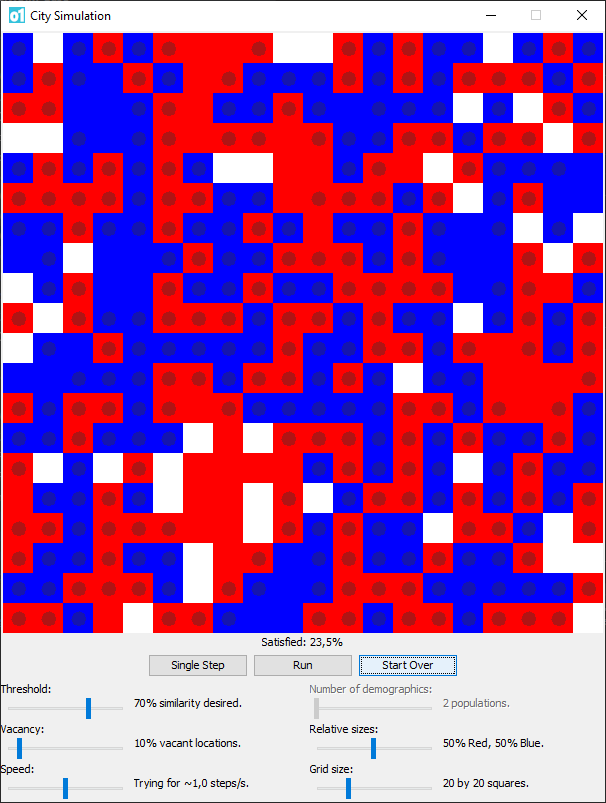
Our simulator is based on a grid that represents a city map.
Each location on the grid is an address that a citizen (or family)
can move into. Blue and red represent different demographics.
Addresses marked in white are currently vacant. Many of the
occupied addresses have a circular mark on them, which means
that those residents are dissatisfied with their current location.
One of the most powerful things about programming is that you can create dynamic
models of phenomena and processes in the real world. In this assignment, we’ll form a
computational model of a social phenomenon. You’ll take control of an application that
simulates people’s movements on a city map; more specifically, this simulation will
explore how demographics may impact on the social layout of a city.
In this context, a demographic is any subset of the city’s population that citizens
may perceive to be relevant as they assess their neighborhood. For instance, we can
split the citizens in demographics on the basis of their financial status, political
views, ethnic background, or age. In this chapter, our simulator will have only two
demographics, red and blue. In Chapter 10.1, we’ll develop the simulator to support
more demographics.
At the start of each simulation run, we place red and blue citizens at random addresses
on the city map. The simulation then advances in steps: at each step, the citizens assess
how satisfied they are with their current neighborhood and may decide to move to a vacant
address instead of remaining where they are. A citizen is satisfied if a sufficiently
large proportion of their neighbors is of the same demographic.
This model is based on the work of Thomas Schelling,
a winner of the Nobel Prize in Economics. Naturally, it is a simplification of the real
world; models are.
Let me remind you of the particular characteristics of all of these
behavior systems. It is that people are impinging on other people
and adapting to other people. What people do affects what other
people do.
—Thomas Schelling
CitySim
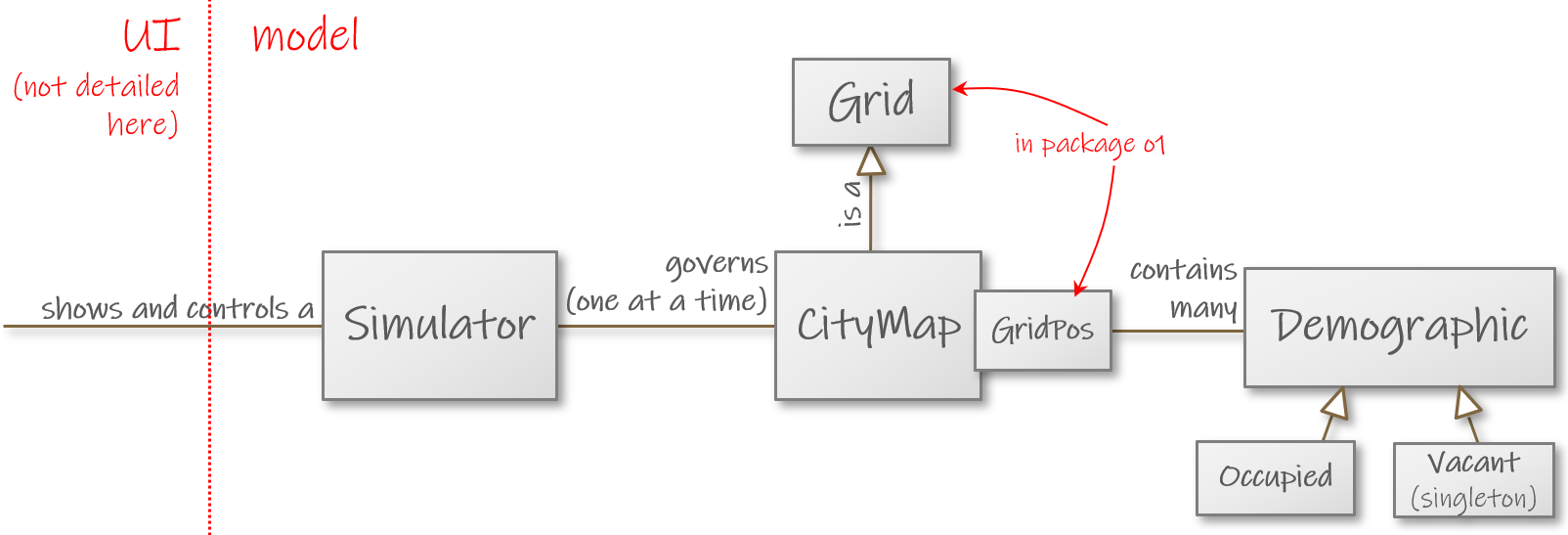
The CitySim module contains two packages. The simulation model itself is in package
o1.city, whose main contents are these:
Simulator (partial implementation given). You can ask a simulator
object to launch a new simulation run (startNew) or advance the
most recently launched simulation by one step (moveResidents).
The simulator delegates some of its work to another object that
represents the map of the city and is of the type:
CityMap (ready as given). A city map is a grid, and CityMap
extends Grid (much like GameBoard and RobotWorld did in
previous assignments). Each of the elements in this grid is of
the following type:
Demographic (missing entirely). This simple sealed trait
serves as a supertype for the Occupied class and the singleton
Vacant, which represent occupied and vacant addresses,
respectively.
The classes in o1.city.gui define the user interface, whose code you may safely ignore.
The only this you need to know is that CitySimApp provides a main function that starts
the application: it creates an instance of Simulator and calls its methods when the user
presses the buttons in the GUI and slides the sliders.
Here’s a diagram of these components:
Task description
Add a sealed Demographic trait and its subordinate concepts Occupied and Vacant.
Add the methods findDemographic, dissatisfiedResidents, and moveResidents in class
Simulator. (The residents method is also missing, but we’ll leave that for later.)
Run the program, experiment with different settings in the UI, and consider how they
affect the results.
See below for hints.
Generic hint for bug hunters
In this assignment, bug hunting may be more difficult because the program’s behavior is
random, so different things happen on each program launch. Fortunately, what we have here
is mere pseudorandomness, which we can affect with a seed number.
When testing, you can make the same things happen on each launch of the program. The
simplest way is this:
At the end of Simulator.scala, find the Simulator object.
Within the object, there is a Random.setSeed line that has
been commented out.
Uncomment the line. You may leave in the seed number already
written there or try another one.
When you now launch SimulatorApp multiple times, the “random”
events will happen identically on each launch. (But if you do
different things in the GUI on different launches, that will
produce different outcomes. And when you edit your code, that
will also have an effect if your edits affect which randomizations
are made.)
Note: The exact trick detailed above only works if you randomize things with the
Random singleton object, using commands like Random.shuffle and Random.nextInt.
It won’t work if you create your own instances of the Random class and call their
methods. (Then again, you don’t need to create such instances in this assignment.)
Hints for Demographic
This is an exceedingly simple trait: it doesn’t have any methods at all. Also, Occupied
and Vacant just need an extends, and that’s about it.
Seal the trait with sealed (Chapter 7.4). Once you do, any Demographic is guaranteed
to be either an Occupied object or Vacant.
Side note
The outcome resembles the Option class and its derivatives
Some and None. And indeed we could have used Option here
instead. However, Demographic and its subtypes communicate
our model better.
Hints for findDemographic
The cityMap instance variable in Simulator gives you a reference to currently active
map, which is a CityMap object that contains Demographic objects in a grid pattern.
This method has a pretty simple implementation, assuming you find the right tools in the
documentation of Simulator and/or CityMap.
Hints for dissatisfiedResidents
A citizen’s satisfaction depends on whether the percentage of similar citizens among the
citizen’s neighbors is high enough. The desired percentage, which the end user sets with
a slider in the GUI, is available to you as a number between 0 and 100 in the variable
similarityDesired.
Every address does not have the same number of neighbors. Note the details in the Scaladocs.
Again, make use of what the CityMap object gives you. Keep in mind that a CityMap is
a sort of Grid and has all the methods it gets from its supertype. For instance, there
is a way to check which demographic currently occupies a particular GridPos.
To determine whether an address is vacant, you can compare what’s at the address with the
Vacant singleton object. The operators == and != serve for that.
Try to split the method’s overall task into subtasks:
For instance, one subtask could be to examine whether a given
address’s neighborhood is unsatisfactory.
Consider writing auxiliary functions for the subtasks. You can
define them either as private methods or as local functions within
dissatisfiedResidents.
If your method computes incorrect results, here are some things to check:
Did you notice that similarityDesired is an integer between 0 and
100, not a Double between 0 and 1?
If you used division, did you remember that any and all decimals
are discarded when you divide an Int by an Int?
Did you make sure to ignore vacant neigbors while checking if a
resident is satisfied?
Did you make sure to leave out vacant addresses from the results?
A vacant address cannot be dissatisfied.
Hints for moveResidents
Make use of the two other methods you implemented.
You may find Random.shuffle useful again (see Chapter 8.1), as well as other methods
in class Random (see Chapter 3.6).
Additional hint for moveResidents
Here’s an outline of a solution:
Form a buffer that contains the addresses
of all vacant homes.
Form a collection that contains the
locations of all the unsatisfied residents,
in random order.
Repeat for each unsatisfied resident: Pick
a random address from the buffer of vacant
homes. Move the resident to that address
on the CityMap. In the buffer, replace
that destination address with the vacated
address.
Note that for each unsatisfied resident, there are two separate
things that you need to update: what’s on the CityMap and
what’s in the auxiliary buffer where you keep the vacant addresses.
Updating one of those things does not automatically cause an update
to the other.
Use the app
Run the simulator on the default settings. Press Single Step repeatedly to
advance the simulation. Try Run, too. Notice that the satisfaction threshold
is set at 70%, meaning that the citizens are easily dissatisfied with their neighborhood.
Try higher and lower values for the threshold.
It seems obvious that if the citizens demand a great number of neighbors similar to
themselves, they end up living among their own demographic. Something that’s not
equally obvious is how demanding the citizens need to be for the phenomenon to occur.
Explore and find out.
Could we use a similar model to explain the echo chambers
on social media?
What real-world factors are ignored by this model?
What would happen if one demographic cares about what their neighbors are like but the
other is always or almost always satisfied? Or what if the citizens didn’t just set a
minimum but also a maximum for the degree of similarity between themselves and their
neighbors?
A+ presents the exercise submission form here.
If this assignment piqued your interest
The book Networks, Crowds, and Markets: Reasoning About a Highly
Connected World,
which is available as a free online edition, will tell you more about
computational modeling of social, economic, and medical phenomena, among
other things. The Schelling model that we just used appears in one of the
book’s chapters.
Feedback
Please note that this section must be completed individually.
Even if you worked on this chapter with a pair, each of you should submit the form separately.
Credits
Thousands of students have given feedback and so contributed to this ebook’s design.
Thank you!
The ebook’s chapters, programming assignments, and weekly bulletins have been written in
Finnish and translated into English by Juha Sorva.
The appendices (glossary, Scala Reference,
FAQ, etc.) are by Juha Sorva unless otherwise specified on the page.
The auto-grading of the assignments has been developed by the following Aalto students (in
alphabetical order): Riku Autio, Kai Bukharenko, Nikolas Drosdek, Kaisa Ek, Rasmus Fyhrqvist,
Joonatan Honkamaa, Antti Immonen, Jaakko Kantojärvi, Onni Komulainen, Niklas Kröger,
Kalle Laitinen, Teemu Lehtinen, Mikael Lenander, Ilona Ma, Jaakko Nakaza, Strasdosky Otewa,
Kaappo Raivio, Timi Seppälä, Teemu Sirkiä, Konsta Suuriniemi, Onni Tammi, Joel Toppinen,
Anna Valldeoriola Cardó, Aleksi Vartiainen, and Oiva Ylönen.
The artful illustrations at the top of each chapter, and the similar ones elsewhere in the
ebook, were drawn by Christina Lassheikki.
The animations that detail the execution of Scala programs have been designed by Juha
Sorva and Teemu Sirkiä. Teemu Sirkiä and Riku Autio did the technical implementation,
relying on Teemu’s Jsvee and Kelmu toolkits. The explanatory texts in the
animations were written by Juha Sorva.
The other diagrams and interactive presentations in the ebook are by Juha Sorva.
The O1Library software has been
developed by Juha Sorva, Aleksi Lukkarinen, and Jaakko Nakaza. Several of its key
components are built upon Aleksi’s SMCL
library.
The pedagogy of using O1Library for simple graphical programming (such as Pic) is
inspired by the textbooks How to Design Programs by Flatt, Felleisen, Findler, and
Krishnamurthi and Picturing Programs by Stephen Bloch.
The A+ Courses plugin,
which supports A+ and O1 in IntelliJ IDEA, is another open-source project. It has been designed and
implemented by various students
in collaboration with O1’s teachers.
The assignment on Schelling’s model of emergent social segregation has been adapted from
a programming exercise by Frank McCown.
Posting submission...
Identical submission
This submission is identical to the previous submission . Are you sure you want to submit it?
An error occurred while sending the submission for grading. Make sure you're connected to the internet. If a submission was consumed, the submission will be automatically graded after the service is available again.